Building a complete PDP image set with 3D: hero, detail, scale, and in-use shots

A product detail page is rarely sold by a single image. Shoppers scroll a gallery: a clean hero, a few angles, close-ups of the details, something that shows scale, and usually a shot of the product in use. Each image answers a different question, and the gaps in a set are where hesitation — and returns — creep in.
Building that full gallery with photography means one shoot has to cover every angle, every detail, and a styled scene, often before the product is even in stock. With 3D, the whole set comes from one accurate model, so the hero, the macro detail, the scale reference, and the lifestyle shot all share the same product and the same quality. This guide breaks down what a complete product-page set contains and how rendering assembles it.

What a complete PDP image set includes
A strong product-page gallery usually contains a clean hero on white, a set of alternate angles, one or more macro shots of materials and mechanisms, a scale or in-hand reference, and at least one in-use or lifestyle image. Many brands also add feature slides: the product with one short callout, such as pump pressure or brew settings, placed in a secondary slot. Some categories add exploded or cutaway views, dimension diagrams, or a 360 spin. The point is coverage: every question a shopper might ask should have an image that answers it.
Transparent House coffee maker front view render Transparent House coffee maker side view render Transparent House coffee maker dimensions render
Front view, side view, and a dimensioned scale shot, all rendered from the same model. CGI by Transparent House.
Why the gallery matters as much as the hero
The hero earns the click, but the gallery earns the purchase. Detail shots build confidence in quality; scale references prevent the size surprises that drive returns; lifestyle images help a shopper picture ownership. How 3D product imagery boosts e-commerce conversions looks at how stronger imagery moves conversion, and marketplaces increasingly reward complete, consistent galleries — a theme in why marketplaces love 3D.
Transparent House coffee maker espresso feature render Transparent House coffee maker brewing feature render
Feature slides carry one short callout each and belong in secondary slots, never on the hero. CGI by Transparent House.
Every shot from one model
With one accurate model, the entire set is a series of cameras and setups rather than separate productions. The hero, the alternate angles, and the macro shots are all the same asset framed differently; the lifestyle image places that asset into a styled scene. Because everything derives from one source, the gallery is automatically consistent in proportion, color, and finish — something that is hard to guarantee across a multi-day photo shoot.
The production process, step by step
Assembling a full gallery follows a clear sequence:
Plan the shot list: hero, angle set, detail and macro, scale reference, and lifestyle.
Build or refine one accurate model with clean topology and correct materials.
Frame and render the hero on a clean background.
Set up the alternate angles and macro cameras on the same asset.
Add a scale reference — a hand, a familiar object, or a dimensioned view.
Build a styled scene and place the product for the lifestyle shot.
Retouch and color-check the full set so it reads as one gallery.
Export each image at the sizes and crops each channel requires.

A typical scenario
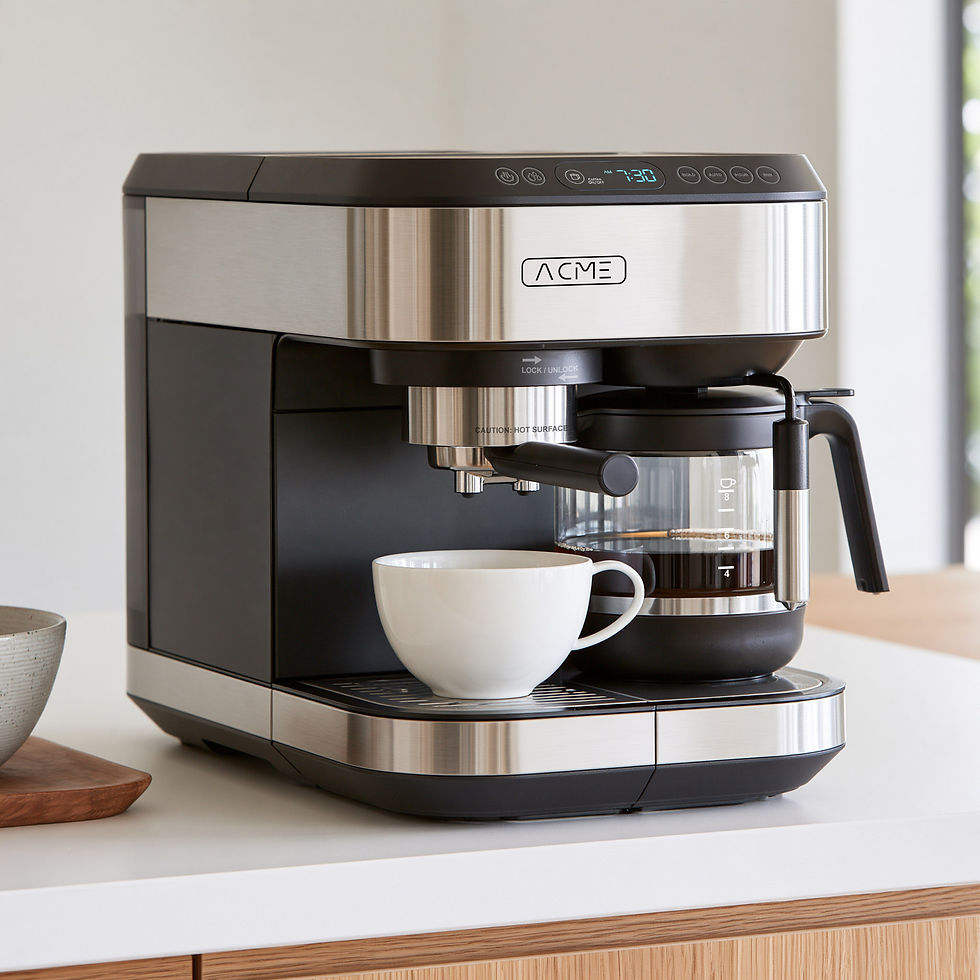
A kitchen appliance brand needs a full product-page gallery for a new 2-in-1 espresso and drip coffee maker before the first units ship. From one model, the team renders a white-background hero, front and side views, a dimension shot with the exact width, depth, and height, two feature slides for the 20-bar pump and the brew settings, and lifestyle scenes in a bright kitchen. The listing goes live with a complete gallery on launch day, and the same assets feed the brand's marketplace listings, social posts, and a vertical Pinterest pin.

Sizing, cropping, and marketplace rules
Different channels want different things: a marketplace may require a pure-white hero at a minimum resolution, while the brand site wants wide lifestyle crops. Because the images come from 3D, producing each required size and crop is an export setting, not a reshoot. Meeting platform rules — like the white-background hero standard covered in the Amazon 3D product rendering guide — is straightforward when the master renders already exist. The same applies to social formats: a vertical 2:3 crop for Pinterest or a 4:5 crop for Instagram is another camera on the existing scene.

Common mistakes to avoid
Common gaps in product-page galleries:
Shipping a hero with no detail or scale shots, so shoppers cannot judge quality or size.
Putting text, badges, or callouts on the hero image, which most marketplaces reject.
Mixing rendered and photographed images that do not match in color or lighting.
Forgetting the lifestyle shot that communicates context and ownership.
Exporting a single size and scrambling later when a channel needs another crop.
Photorealistic 3D rendering vs traditional photography is a useful comparison when deciding how much of the gallery to render versus shoot.
Getting started
Write your shot list first — it defines the model and the cameras. Have the product modeled accurately, render the hero to lock the look, then fill in angles, details, scale, and lifestyle. Keep the model and scenes so refreshing or extending the gallery later is cheap. Our photorealistic 3D product rendering service can build the model and deliver the full set, and how to launch a new kitchenware line without a traditional photo studio shows the approach applied end to end.
Frequently asked questions
What images should a product detail page include?
At minimum a clean hero, several alternate angles, close-up detail shots, a scale or in-hand reference, and one lifestyle or in-use image. Some categories add 360 spins, exploded views, or dimension diagrams.
Can the whole gallery come from one 3D model?
Yes. The hero, angles, macros, scale views, and lifestyle shots are all the same accurate asset framed and staged differently, which keeps the entire set consistent in proportion, color, and finish.
How does 3D help with marketplace image rules?
Because the master renders already exist, producing each platform required size, crop, and background — such as a pure-white hero — is an export step rather than a new shoot.
Do I need lifestyle shots if I have clean product shots?
Usually yes. Clean shots communicate the product; lifestyle shots communicate context, scale, and ownership. Together they answer more of a shopper questions and reduce hesitation.
Can we add more images later without reshooting?
Yes. As long as the model and scenes are kept, new angles, details, or seasonal lifestyle shots are additional renders rather than a new production.
Can I put text or feature callouts on the main image?
Not on the main image for most marketplaces: Amazon and Google Merchant Center expect a clean product on a white background with no added text or badges. Feature callouts work well on secondary images, and with 3D you can render the same shot in both a clean and an annotated version.


