3D rendering for the home-office and desk-setup market: a brand’s guide

The home-office and desk-setup market has grown into a category of its own. It spans standing desks, monitor arms, ergonomic chairs, laptop stands, keyboards and mice, docks, task lighting, and the accessories that tie a workspace together. Much of it is sold as a look — a coordinated setup — as much as individual products.
That makes imagery unusually demanding. A desk-setup brand has to show each product cleanly and show how everything works together on a real desk, across finishes and configurations. 3D rendering fits this category well because a single set of accurate models can produce both the clean product shots and the complete styled setup. This guide covers how, and where it pays off.

A category built from bundles
Desk-setup shoppers rarely buy one thing. They assemble a workspace: a desk, a chair, a monitor arm, a dock, a light, a cable tray. Brands respond with bundles and coordinated ranges, which means the imagery has to work at two levels — the individual product on its page, and the whole setup that shows how it comes together. Photographing both, across finishes, is a large and repetitive production.
Why desk-setup brands are moving to 3D
Desk-setup products combine the traits that make 3D efficient: engineered hardware with CAD, multiple finishes, and a strong need for lifestyle context. From accurate models a brand gets clean hero shots for each SKU and styled desk scenes for the range, all consistent. It is the same logic that benefits furniture 3D rendering and consumer electronics 3D rendering, applied to a category that sits between the two.
Showing the whole setup, not just one product
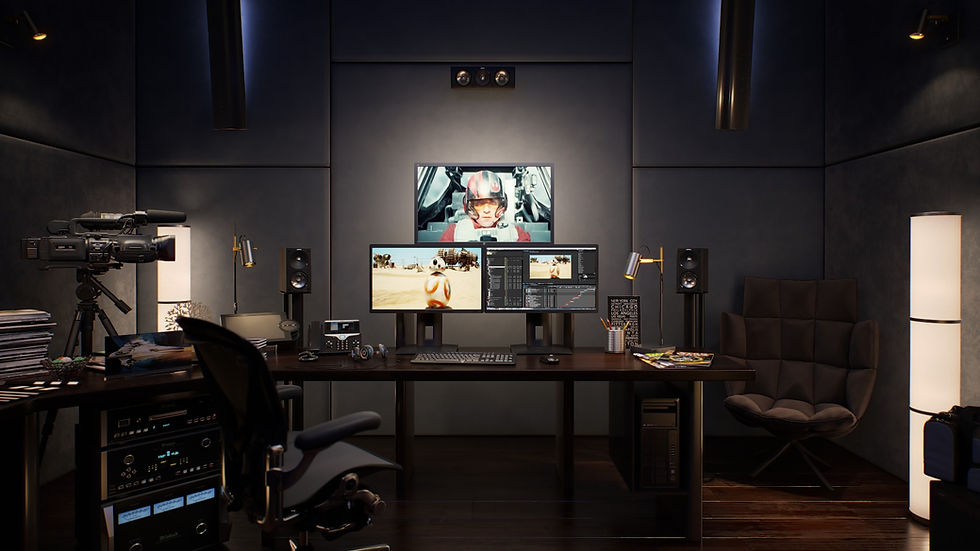
The signature shot for this market is the complete desk: monitor mounted, keyboard and mouse placed, light angled, cables managed. In 3D that scene is assembled from the individual product models, so it is always accurate and easy to restyle. Swap the desk finish, change the chair color, or reconfigure the layout, and the setup updates without a new shoot. Interactive 3D product configurators can even let shoppers build their own setup from the same assets.
The production process, step by step
A desk-setup project follows a clear sequence:
Collect CAD or measurements for each product and the finish and configuration options.
Build accurate models of the desk, chair, arm, peripherals, and accessories.
Author materials — wood, laminate, powder-coated metal, fabric, plastic, and glass.
Render clean hero and angle shots for each individual SKU.
Assemble a styled desk scene from the product models and light it.
Produce finish and configuration variants on the same scene.
Retouch and color-check so products and setup read consistently.
Export product, setup, and any configurator assets in the required sizes.
A typical scenario
A desk-setup brand launches a standing desk in three tops and two frame colors, plus a matching monitor arm and cable tray. From accurate models, the team renders each product cleanly, then builds a styled desk scene showing the full setup. The three tops and two frames become six matched setup images from the same scene, and the individual products get their own product-page galleries — all before stock arrives.
Materials, cable management, and the details buyers notice
This is a category where buyers zoom in. They look at the grain of a desktop, the texture of a powder-coated frame, the fabric of a chair, and — increasingly — how tidily the cables are managed. 3D lets those details be shown accurately and consistently, and cable routing that would be fiddly to stage physically can be arranged cleanly in a scene. Getting the materials right is what makes a rendered setup feel aspirational rather than generic — the same detail focus in product rendering for electronics and gadgets.
Common mistakes to avoid
The frequent mistakes: showing only individual products and never the assembled setup buyers are trying to picture; inconsistent finishes between the product shots and the setup scene; and ignoring cable management, which is exactly what this audience notices. Another is skipping the lifestyle context that sells the aspiration. How 3D product imagery boosts e-commerce conversions explains how the completeness of a gallery affects conversion.
Getting started
Pick your flagship setup — a desk, a chair, and the key accessories — and have those modeled accurately. Render each product, then assemble the styled setup, then add finish variants. Keep the models and scene so new products drop into the existing setup easily. Our photorealistic 3D product rendering service builds the models and the setup scenes, and what photorealistic 3D product rendering is is a helpful primer if your team is new to product rendering.

Frequently asked questions
What is the home-office and desk-setup market?
It is the category of products that make up a workspace — desks, chairs, monitor arms, laptop stands, keyboards, mice, docks, lighting, and cable accessories — often sold as coordinated bundles rather than only as single items.
Can 3D show a full desk setup, not just single products?
Yes. A complete styled desk is assembled from the individual product models, so the setup is accurate and easy to restyle, and the same models still produce clean single-product shots.
How are finish and configuration options handled?
Each finish is a material and each configuration is a layout of the same models, so producing multiple tops, frame colors, or arrangements is a set of variations rather than separate shoots.
Is this suitable before products are in stock?
Yes. With accurate models built from CAD or measurements, both product and setup imagery can be produced before the first units arrive.
Can shoppers build their own setup?
They can if the assets feed an interactive configurator, which uses the same 3D models to let visitors swap products, finishes, and layouts themselves.


